
15,000+ Oxxigen ventilation units sold annually in Germany - now also available in Australia!

Installation
- it just works -
Easy installation and setup are only one of the many advantages the Oxxify and Novarius offer. The below examples provide an overview of the individual installation steps – but rest assured, we also have detailed installation manuals that describe every individual step.
The electrical hardwiring must be undertaken by a certified electrician, everything else can fall into category DIY – comparable to any other fan installation.
The most common method is installing the ventilation unit in an external wall, however there are also alternative options, such as via the roof space or other voids and existing ducting. Please reach out to discuss your individual installation challenge; we may already have the answer and otherwise are happy to come up with new solutions.
Also, no expert commissioning required – these ventilation units have fully embraced the concept of plug and play – it just works.
Brick veneer wall
Example 1
The below installation example shows how we installed the Novarius in our own brick veneer wall with an approx. total buildup of 240 mm.
Please note that the below photos do not cover the electric wiring which is to be undertaken by a certified electrician.

Step 1
Cut a 180 mm diameter hole on the inside of the wall and install wiring. Here, a 180 mm hole saw was used to cut the plasterboard.

Step 2
Drill a 180 mm diameter circular profile on the outside and chip away the brick. The Novarius comes with an EPP pipe that can be easily cut to size to match the individual wall thickness.

Step 3
Slide in the EPP pipe and wedge in with the provided polystyrene wedges to a 3 degree angle (approx.). The intention for the slight tilt to the outside is that any potential condensate drains to the outside.
Connect wiring and fix the internal face.

Step 4
Insert the heat recovery cartridge (also refer to photos in example 2) and connect heat recovery unit with wiring.
Now click on the internal cover.

Step 5
Fit the external cover to the wall.
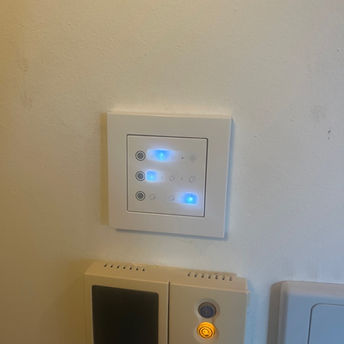
Step 6
For Novarius only: Install wall mounted controller, either hardwired or wireless.
The wall controller sets fan speeds, humidity control levels, and whether unit(s) operate in heat recover or supply/exhaust mode. Some additional controls such as 'night mode' or 'landlord mode' are also set here.
Weatherboard wall
Example 2
The below installation example shows how we installed an Oxxify Smart in a sample weatherboard wall with a 90 mm stud, and an approx. total buildup of 140 mm. We used the separately sold external hood from Siku to compensate the thin wall thickness and make space for the 260 mm long heat recovery cartridge - cause that's where the efficiency/magic is happening - and you wouldn't want to compromise on that!
Please note that the below photos do not cover the electric wiring which is to be undertaken by a certified electrician.

Step 1
We used a holesaw, a reciprocating saw and a router to cut the 180mm diameter hole - but there are certainly many ways and tools to achieve the same outcome. We chose the location so that the external hood will sit just below the weatherboard above.

Step 1
We pushed the cut to length PVC pipe from the outside to the back of the plasterboard wall to mark where the inside hole needed to be cut. The PVC pipe now rests on the plasterboard and weatherboard, fastened and tilted by 3 degrees by polystyrene wedges (included but not in photo). Then the internal cover is fastened.

Step 3
Next the external wall plate is fastened. As mentioned, we chose a 10 mm gap to the above weatherboard. The plate comes with foam backing for waterproofing, but additional silicone could be applied.

Step 4
Now the remainder of the external hood is fastened with four screws.

Step 5
Back inside, the cartridge (photo without the filter) has been pushed into the PVC tube for final wiring and connection.

Step 6
This is what the finished result of our sample weatherboard wall looks like. The Oxxify Smart is now controlled via app, remote control, or buttons on the unit.